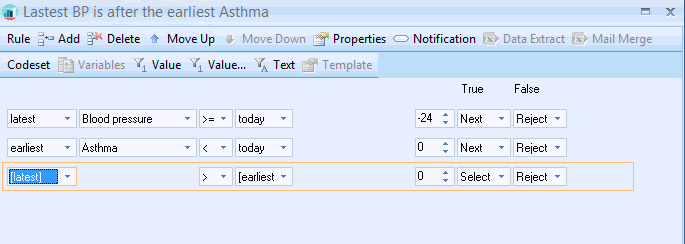
The variables in the parameter drop down can be used in multiple scenarios They are used to store dates from one Rule line then used later on in another rule line in the Rule node, or even in another Rule Node.
There are 4 Variables available:
The Variables are just place holders and you do not have to used them implicitly. E.g. the [latest] variable could be used to store the earliest occurrence date of a codeset
Example
The date stored in the [latest] variable is checked to see if it is after the date stored in the [earliest] variable.
If a date from the Blood pressure codeset exists it will be stored in the [latest] variable. Any date that exists from the Asthma codeset will be stored in the [earliest] variable.
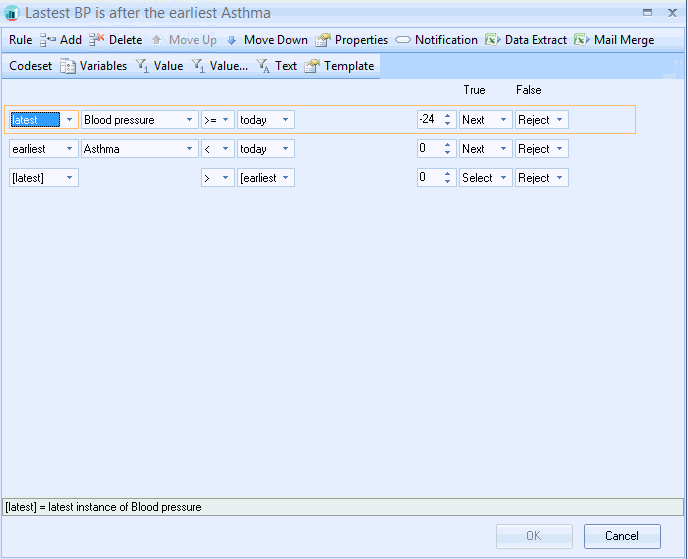

Assigning a variable to a Rule Line
• Open your Rule Node and create your Rule Line(s)
• Click anywhere on the Rule Line you wish to use; to select it.
• Click the Variables button.

This activates the Codeset variables screen:
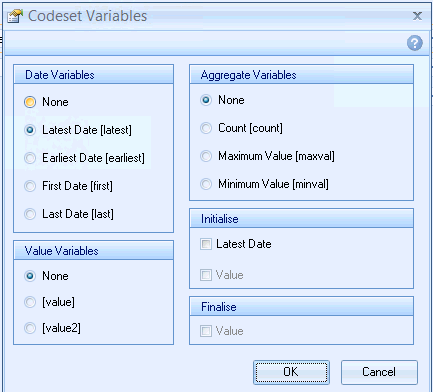
• Select the Latest Date [latest] radio button and click OK.
This then displays as an information line in the base of the Rule node design screen.

• Repeat the process on the other Rule Line using the Earliest Date [earliest] radio button.
• Create your rule Line and select the [latest] and [earliest] variables from the drop down boxes.